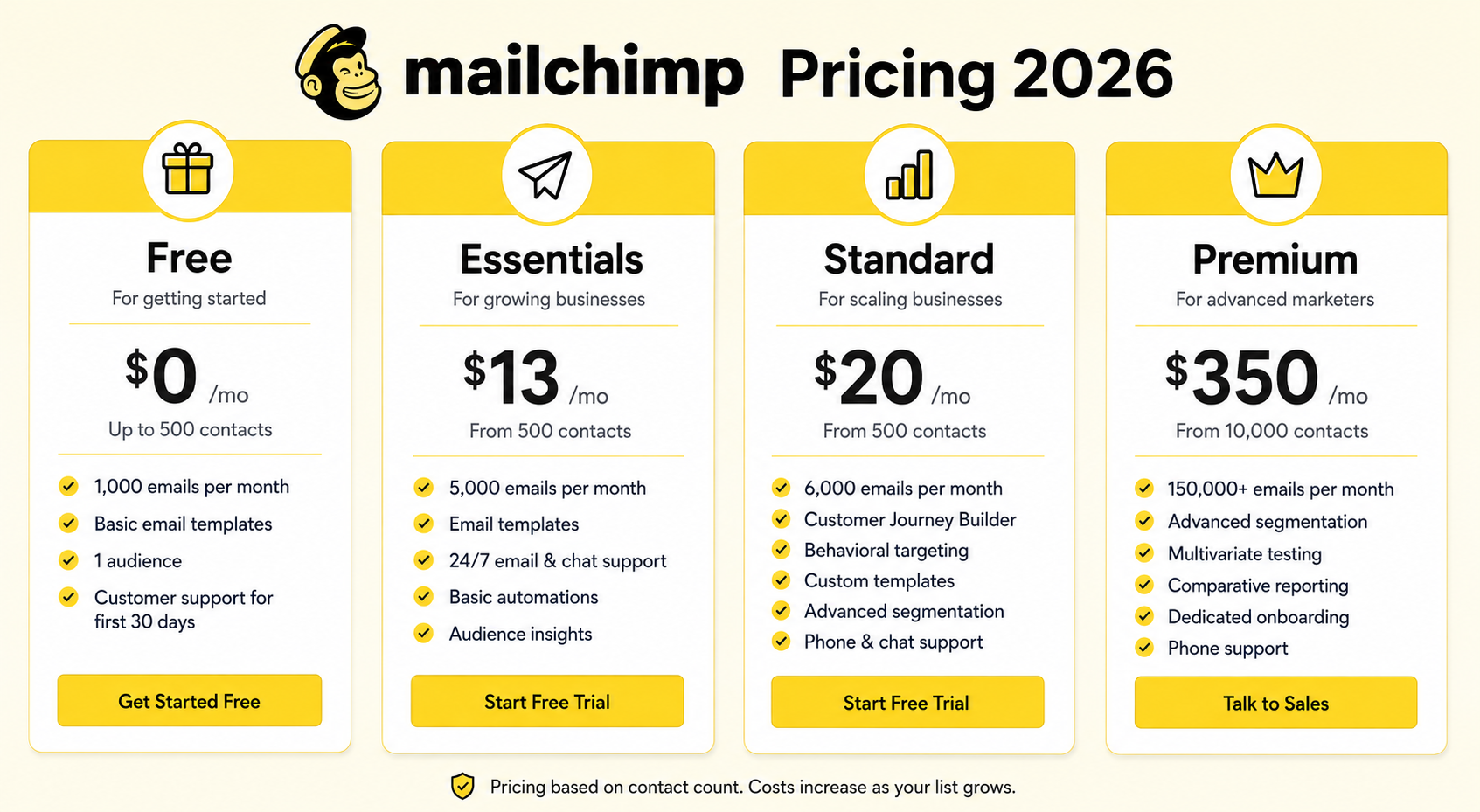

TL;DR: Mailchimp’s 2026 pricing starts free for up to 500 contacts, then scales from $13/month (Essentials) to $350+/month (Premium) based on list size and features. The real cost driver isn’t the plan tier — it’s your contact count, which can quietly double your bill as your list grows. Budget for 20-30% above your current tier if you’re actively growing your list.
Executive Summary
Mailchimp’s pricing page looks simple until you actually try to estimate your real monthly cost. The advertised “starting at” prices only apply to your smallest contact tier and most limited feature set — most businesses end up paying considerably more once they factor in list growth, extra sends, and add-ons.
This guide breaks down exactly what you’ll pay at every plan and contact tier, which features are gated behind which plans, and the hidden costs that catch most users off guard.
Who This Guide Is For
- Business owners evaluating Mailchimp before signing up
- Current users trying to understand why their bill increased
- Marketers comparing Mailchimp’s true cost against competitors
- Agencies estimating client budgets for email marketing tools
Mailchimp’s Four Pricing Tiers: Overview
| Plan | Starting Price | Contacts Included | Best For |
|---|---|---|---|
| Free | $0/month | Up to 500 | Testing the platform, very small lists |
| Essentials | From $13/month | Up to 50,000 | Small businesses needing basic automation |
| Standard | From $20/month | Up to 100,000 | Growing businesses needing A/B testing |
| Premium | From $350/month | 200,000+ | Large lists needing advanced segmentation |
Free Plan: What You Actually Get
Mailchimp’s free plan covers up to 500 contacts and 1,000 sends per month. It’s a genuinely useful starting point, but comes with real constraints.
Included:
- Single-step automations (welcome email, simple triggers)
- Basic templates and drag-and-drop editor
- 1 audience (contact list)
- Mailchimp branding on all emails (cannot be removed)
Not included:
- A/B testing
- Multi-step customer journeys
- Custom branding removal
- Phone or live chat support
Reality check: Once you cross 500 contacts, you’re forced onto a paid plan immediately — there’s no warning grace period. Plan your upgrade before you hit the limit.
Essentials Plan: $13–$300+/month
The Essentials plan removes Mailchimp branding and unlocks basic A/B testing, but pricing scales steeply with contacts.
| Contacts | Approx. Monthly Price |
|---|---|
| 500 | $13 |
| 2,500 | $36 |
| 10,000 | $80 |
| 50,000 | $300 |
Included:
- Remove Mailchimp branding
- Basic A/B testing (subject lines only)
- Email + chat support
- Custom branding on emails
Not included:
- Multi-step customer journeys
- Send-time optimization
- Advanced segmentation
- Comparative reporting
Standard Plan: $20–$540+/month
Standard is Mailchimp’s most popular tier and the one most ecommerce businesses end up choosing.
| Contacts | Approx. Monthly Price |
|---|---|
| 500 | $20 |
| 2,500 | $59 |
| 10,000 | $130 |
| 100,000 | $540 |
Included:
- Multi-step customer journeys (basic branching)
- Send-time optimization
- Advanced audience segmentation
- A/B testing for content, not just subject lines
- Dynamic content blocks
Not included:
- Phone support
- Advanced predictive demographics
- Premium-tier reporting
Premium Plan: $350+/month
Premium is built for large lists and teams that need enterprise-level controls.
| Contacts | Approx. Monthly Price |
|---|---|
| 10,000 | $350 |
| 50,000 | $625 |
| 200,000 | $1,500+ |
Included:
- Advanced segmentation with unlimited conditions
- Comparative reporting (campaign vs. campaign)
- Multivariate testing
- Phone support
- Priority support queue
Reality check: At Premium-tier list sizes, it’s worth comparing Mailchimp against Klaviyo, Brevo, or Omnisend — the price gap narrows significantly and competitors often offer stronger ecommerce features at this scale.
Hidden Costs Mailchimp Doesn’t Advertise Upfront
1. Overage Charges for Extra Sends
Each plan includes a send limit (10x your contact limit on Free, higher on paid plans). Exceeding it triggers automatic overage charges billed at the end of the month — not blocked, just billed.
2. Multiple Audiences Fee
Mailchimp counts contacts across all audiences, even if the same person is duplicated in two lists. Businesses running multiple audiences for segmentation often pay for contacts twice.
3. Transactional Email Add-On
Order confirmations, password resets, and shipping notifications are not included in standard plans. Mailchimp Transactional Email (formerly Mandrill) is a separate paid add-on starting around $20/month for 25,000 emails.
4. Annual vs. Monthly Billing Trap
Mailchimp advertises a discount for annual billing (up to 15% off), but locks you into a year-long commitment. If your list shrinks or you switch platforms, there are no partial refunds.
5. Inactive Contact Billing
Mailchimp bills based on total contacts, including unsubscribed and cleaned contacts in some configurations. Regularly audit and remove unengaged contacts to avoid paying for dead weight.
How to Estimate Your Real Mailchimp Cost
Use this formula before committing:
- Count your current active contacts (not your total list — active, engaged ones)
- Project growth over 12 months (most lists grow 5-10% monthly with consistent lead gen)
- Add 20% buffer for duplicate contacts across audiences
- Check your required features (do you need multi-step journeys? Then you need Standard minimum)
- Compare against the next tier up — if you’re within 15% of the next contact bracket, budget for it now
Mailchimp Pricing vs. Competitors (Quick Snapshot)
| Platform | Price at 10,000 Contacts | Ecommerce Features |
|---|---|---|
| Mailchimp (Standard) | ~$130/month | Basic |
| Klaviyo | ~$100/month | Advanced |
| Brevo | ~$65/month | Moderate |
| Omnisend | ~$120/month | Advanced |
For pure ecommerce use cases, Mailchimp is rarely the cheapest option once you factor in feature gaps versus competitors at the same price point.
Frequently Asked Questions
Does Mailchimp charge for unsubscribed contacts?
Generally no for fully unsubscribed contacts, but “cleaned” or bounced contacts may still count toward your limit depending on your account settings. Audit your audience regularly.
Can I downgrade my Mailchimp plan anytime?
Yes, you can downgrade at the start of your next billing cycle. However, downgrading may disable features you’re actively using, such as multi-step automations.
Is Mailchimp cheaper than Klaviyo?
At small list sizes (under 1,000 contacts), Mailchimp is often cheaper. At 10,000+ contacts, the gap narrows or reverses, especially when factoring in Klaviyo’s stronger ecommerce ROI.
What happens if I exceed my send limit?
Mailchimp doesn’t block your sends. Instead, it bills you for the overage automatically at the end of your billing cycle, typically at a per-1,000-email rate.
Does the free plan include automation?
Yes, but only single-step automations like a basic welcome email. Multi-step journeys require at least the Standard plan.
Is annual billing worth it?
If you’re confident your list size and feature needs will stay stable for 12 months, yes — it saves up to 15%. If you expect to switch platforms or your list is volatile, monthly billing offers more flexibility.
Does Mailchimp have a contract or cancellation fee?
No long-term contract is required on monthly billing. Annual plans are paid upfront and are generally non-refundable if you cancel early.
How much does Mailchimp cost for 5,000 contacts?
Roughly $36-45/month on Essentials, or $59-75/month on Standard, depending on which features you need.
Final Verdict
Mailchimp’s pricing is competitive at the low end but becomes harder to justify as your list grows past 10,000 contacts — especially for ecommerce businesses where competitors offer stronger automation and attribution at similar price points.
Before committing to a plan, calculate your real cost including projected growth and hidden fees, not just the advertised “starting at” price. For most growing businesses, Standard is the practical minimum; Essentials feels limiting within the first few months.
Pricing reflects publicly available Mailchimp rates as of mid-2026. Mailchimp updates pricing periodically — verify current rates on their official pricing page before purchasing.