
TL;DR: Session recording tools like Hotjar, FullStory, and Mouseflow capture detailed user behavior that can constitute personal data processing under GDPR and CCPA, requiring proper consent mechanisms, sensitive field masking, and clear privacy policy disclosure. Most platforms offer built-in masking for passwords and payment fields, but compliance ultimately depends on your specific configuration and disclosure practices, not just the tool’s default settings.
Executive Summary
Session recording tools provide genuinely valuable insight into user behavior, but they also capture significantly more detailed personal data than standard analytics — mouse movements, scroll patterns, form interactions, and sometimes typed content. This depth of capture raises specific privacy compliance considerations that businesses often overlook when implementing these tools, focused more on the UX insight than the privacy implications.
This guide explains exactly what compliance requirements apply, how to configure session recording tools properly, and what disclosure obligations exist.
Who This Guide Is For
- Businesses using or considering Hotjar, FullStory, Mouseflow, or similar session recording tools
- Privacy and compliance teams auditing existing UX analytics implementations
- UX researchers and marketers wanting to use session recordings without compliance risk
- Companies serving EU/UK or California audiences with session recording active
Why Session Recording Raises Distinct Privacy Considerations
Standard analytics tools typically report aggregate trends — page views, bounce rates, conversion percentages. Session recording captures individual-level behavioral detail, sometimes including:
- Mouse movements and click patterns specific to an individual visitor
- Scroll behavior and time spent on specific page elements
- Form field interactions, potentially including partially typed content before sensitive fields are properly masked
- In some configurations, indirect identification through behavioral fingerprinting even without explicit personal identifiers
This level of detail means session recording more readily falls within the scope of personal data protections under GDPR and similar frameworks compared to purely aggregate analytics.
GDPR Considerations for Session Recording
Legal Basis Requirement
Under GDPR, you need a lawful basis to process this data — most commonly consent, though some businesses argue legitimate interest for non-sensitive UX research purposes. Consent is the safer, more defensible basis for most implementations.
Consent Banner Implications
If your session recording tool isn’t configured for genuinely anonymized, non-identifying capture, it likely requires inclusion in your cookie/tracking consent banner alongside other tracking technologies, with users able to decline this specific category if you offer granular consent options.
Data Minimization
Recording entire sessions indiscriminately, including unrelated personal information visitors might display on screen, exceeds what’s strictly necessary for UX research purposes — proper field masking and selective recording scope help satisfy minimization principles.
CCPA Considerations for Session Recording
Under CCPA, the primary considerations are:
- Disclosure in your privacy policy about session recording as a data collection practice
- Honoring opt-out requests if your session recording activity could be considered “sharing” personal information with the session recording vendor for purposes that trigger CCPA’s opt-out rights
- Responding to access and deletion requests that might include session recording data tied to a specific individual
Configuring Session Recording Tools for Compliance
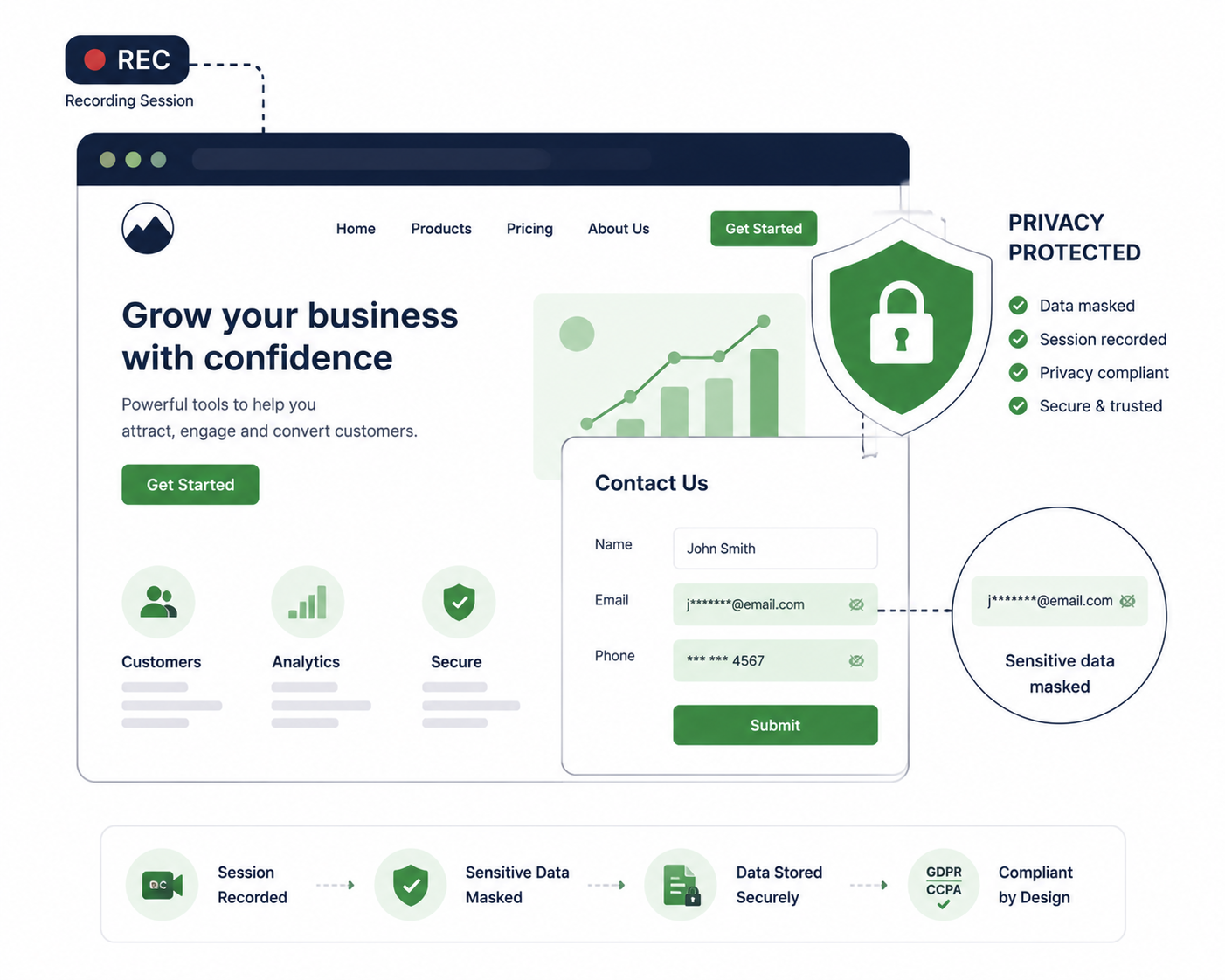
1. Enable Sensitive Field Masking
Most platforms (Hotjar, FullStory, Mouseflow) offer built-in masking for password fields by default, but you should explicitly configure masking for:
- Payment and credit card information fields
- Social security numbers or other government identifiers
- Health information fields, if applicable to your business
- Any other fields containing sensitive personal data
2. Limit Recording Scope
Consider whether you genuinely need to record every page and every session, or whether scoping recording to specific high-priority pages (checkout, key landing pages) reduces unnecessary data collection while still providing the insight you need.
3. Set Appropriate Data Retention Periods
Configure your session recording tool’s data retention settings to align with genuine business need — most platforms allow configuring automatic deletion after a defined period rather than indefinite retention.
4. Implement Proper Consent Integration
Connect your session recording tool to your consent management platform so that recording only activates for visitors who have provided appropriate consent, particularly relevant for EU/UK visitors under GDPR’s opt-in requirements.
(See our CMP Comparison guide for consent management platform options.)
5. Disclose Clearly in Your Privacy Policy
Explicitly describe your use of session recording technology, what data is captured, how long it’s retained, and how users can exercise relevant privacy rights regarding this specific data category.
Platform-Specific Compliance Features
| Platform | Built-In Masking | Consent Integration | EU Data Hosting Option |
|---|---|---|---|
| Hotjar | Yes, configurable | Yes, with major CMPs | Yes |
| FullStory | Yes, configurable | Yes, with major CMPs | Yes |
| Mouseflow | Yes, configurable | Yes, with major CMPs | Yes |
| Microsoft Clarity | Yes, configurable | Limited native, requires manual integration | Varies |
| Lucky Orange | Yes, configurable | Yes, with major CMPs | Limited |
Important: Built-in masking features must be actively configured for your specific form fields — most platforms don’t automatically detect and mask all sensitive fields without explicit setup.
Common Session Recording Compliance Mistakes
| Mistake | Risk |
|---|---|
| Not masking payment or sensitive form fields | Potential capture of highly sensitive personal data without protection |
| No mention of session recording in privacy policy | Lack of required transparency disclosure |
| Recording activated before consent banner interaction | Processing personal data before establishing a lawful basis under GDPR |
| Indefinite data retention without review | Conflicts with data minimization principles |
| No process for honoring deletion requests for recorded sessions | Inability to fulfill right to erasure obligations |
Building a Compliant Session Recording Implementation
Step 1: Audit What You’re Currently Recording
Review your current session recording configuration to identify exactly what pages and form fields are being captured, and whether sensitive fields are properly masked.
Step 2: Configure Masking for All Sensitive Fields
Don’t rely on default settings — explicitly review and configure masking for every form field that could capture sensitive personal information.
Step 3: Integrate With Your Consent Management Platform
Ensure session recording only activates after appropriate consent for visitors where this is legally required (generally EU/UK visitors under GDPR’s opt-in standard).
Step 4: Update Your Privacy Policy
Explicitly disclose session recording as a data collection practice, including what’s captured, retention period, and how to exercise relevant privacy rights.
Step 5: Set Reasonable Retention Periods
Configure automatic deletion after a defined period rather than retaining session recordings indefinitely without ongoing business justification.
Step 6: Establish a Deletion Request Process
Ensure you can locate and delete session recording data tied to a specific individual if a valid deletion request is received.
Frequently Asked Questions
Does session recording require a cookie consent banner?
In most configurations, yes — unless the tool is specifically configured for fully anonymized, non-identifying capture, session recording typically falls within the scope of tracking technologies requiring consent disclosure under GDPR.
Is it legal to record users typing in form fields?
This depends heavily on configuration. Sensitive fields (passwords, payment information) must be masked, and even non-sensitive field interaction should be disclosed in your privacy policy as part of your data collection practices.
Can I use session recording without consent if I mask all sensitive data?
Masking sensitive fields reduces risk but doesn’t necessarily eliminate the consent requirement entirely, since the broader behavioral tracking itself may still constitute personal data processing requiring a lawful basis under GDPR.
Do all session recording tools support GDPR compliance features?
Most major platforms (Hotjar, FullStory, Mouseflow) offer masking, consent integration, and EU data hosting options, but these features require active configuration rather than being automatically compliant by default.
How long should I retain session recordings?
This should align with genuine business need rather than indefinite retention — many businesses retain recordings for 30-90 days for UX research purposes, configuring automatic deletion afterward.
What happens if a user requests deletion of their session recording data?
You must have a process to locate and delete the specific individual’s recorded sessions, similar to right to erasure obligations for other personal data your business holds.
Is Microsoft Clarity’s free session recording compliant with GDPR?
Clarity offers masking and configuration options similar to paid competitors, but compliance depends on how you configure and disclose its use, not on the tool being inherently compliant by default.
Should I disclose session recording separately from general analytics in my privacy policy?
Yes, given the more detailed nature of data captured, explicitly distinguishing session recording from standard aggregate analytics in your privacy policy provides clearer, more accurate disclosure to users.
Final Verdict
Session recording tools provide valuable UX insight, but their detailed data capture requires deliberate compliance configuration — proper field masking, consent integration, reasonable retention periods, and clear privacy policy disclosure. Default tool settings alone don’t guarantee compliance; the responsibility for proper configuration and disclosure rests with your business, not the vendor.
Before activating or continuing to use session recording on your website, audit your current configuration against the compliance steps in this guide, particularly sensitive field masking and consent integration, which represent the highest-risk gaps in typical implementations.
This guide provides general informational content and does not constitute legal advice. Privacy regulations are complex and continue to evolve — consult a qualified privacy attorney for guidance specific to your business and implementation.