
TL;DR: Strong email deliverability in 2026 requires properly configured SPF, DKIM, and DMARC authentication records, consistent positive engagement signals (opens, clicks, replies), regular list hygiene to remove inactive or invalid addresses, and compliance with bulk sender requirements from Gmail and Yahoo. Technical setup alone isn’t enough — recipient engagement is now the dominant factor mailbox providers use to determine inbox placement.
Executive Summary
Email deliverability determines whether your carefully crafted campaigns actually reach the inbox or quietly land in spam folders, never to be seen. Unlike a few years ago, deliverability in 2026 depends less on simple technical checklist items and more on genuine recipient engagement, since Gmail, Outlook, and Yahoo all now weight real-world engagement heavily in their spam filtering algorithms.
This guide covers both the technical authentication setup and the ongoing practices needed to maintain strong sender reputation in today’s stricter deliverability environment.
Who This Guide Is For
- Businesses noticing declining open rates or increased spam folder placement
- Marketers setting up a new sending domain for the first time
- Companies preparing to meet Gmail and Yahoo’s bulk sender requirements
- Anyone managing email marketing or transactional email at meaningful volume
The Three Pillars of Email Deliverability
1. Technical Authentication
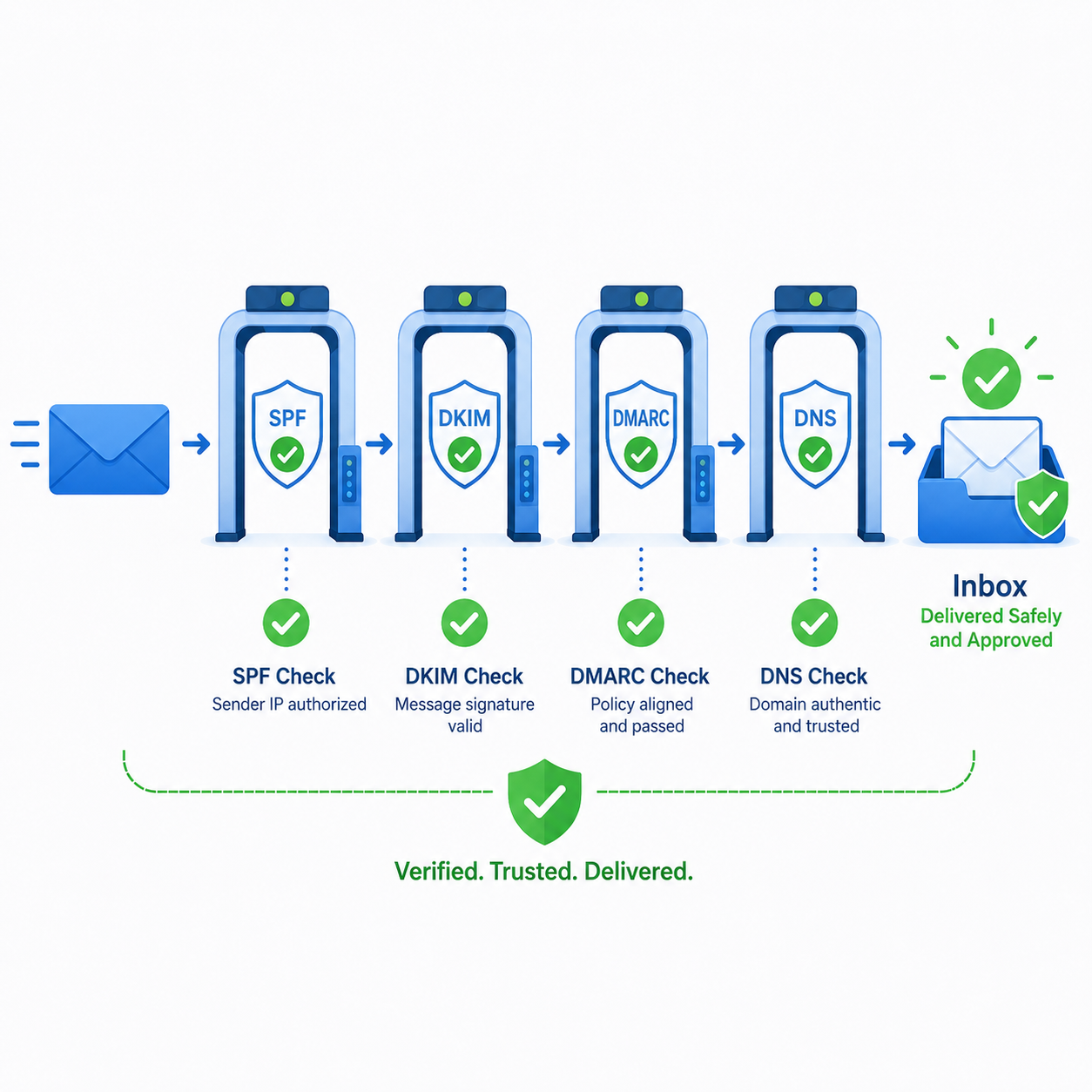
SPF, DKIM, and DMARC records that prove your emails are legitimately sent from your domain, not spoofed by a malicious sender.
2. Sender Reputation
A score, maintained by mailbox providers, reflecting your domain and IP’s historical sending behavior — engagement rates, complaint rates, and spam trap hits.
3. List Quality and Engagement
The health of your actual subscriber list — how many recipients genuinely want your emails and engage with them, versus inactive or invalid addresses dragging down your metrics.
Setting Up Email Authentication Correctly
SPF (Sender Policy Framework)
SPF specifies which mail servers are authorized to send email on behalf of your domain. Without it, receiving servers have no way to verify your emails aren’t being spoofed.
Implementation: Add a TXT record to your domain’s DNS listing all authorized sending sources (your email platform, CRM, transactional email service).
DKIM (DomainKeys Identified Mail)
DKIM adds a cryptographic signature to your emails, allowing receiving servers to verify the message wasn’t altered in transit and genuinely originated from your domain.
Implementation: Your email service provider generates a DKIM key pair; you add the public key as a DNS TXT record, and the provider signs outgoing emails with the private key.
DMARC (Domain-based Message Authentication, Reporting & Conformance)
DMARC builds on SPF and DKIM, telling receiving servers what to do with emails that fail authentication (reject, quarantine, or allow) and providing reporting on authentication failures.
Implementation: Add a DMARC TXT record specifying your policy. Start with a monitoring-only policy (p=none) to observe results before moving to stricter enforcement (p=quarantine or p=reject).
(For a detailed setup walkthrough, see our DMARC SPF DKIM Setup Guide.)
Gmail and Yahoo’s Bulk Sender Requirements
Since 2024, Gmail and Yahoo have enforced stricter requirements for anyone sending high volumes of email, which remain in effect and continue to evolve in 2026:
- Valid SPF and DKIM authentication is now mandatory, not optional, for bulk senders (generally 5,000+ emails per day to the same provider)
- DMARC policy must be in place, even if set to monitoring-only
- One-click unsubscribe must be supported via the List-Unsubscribe header, not just a link buried in email content
- Spam complaint rates must stay below 0.3% — exceeding this threshold consistently triggers filtering or blocking
Reality check: These requirements apply regardless of whether you consider yourself a “bulk sender” — if your sending volume crosses the threshold to any single provider, compliance becomes mandatory for continued deliverability.
Engagement Signals That Drive Inbox Placement
Modern spam filtering weighs actual recipient behavior more heavily than ever:
| Positive Signal | Negative Signal |
|---|---|
| Opens and clicks | Deletions without opening |
| Replies | Marking as spam |
| Moving emails out of spam/promotions | Repeated non-engagement over time |
| Adding sender to contacts | High unsubscribe rate relative to sends |
Why this matters: Sending to a large but disengaged list actively damages your sender reputation, even if those contacts never explicitly complain — silent non-engagement is itself a negative signal that compounds over time.
List Hygiene Practices
Remove Hard Bounces Immediately
A hard bounce indicates the email address doesn’t exist. Continuing to send to hard-bounced addresses signals poor list management to receiving servers.
Suppress Long-Term Inactive Subscribers
Contacts who haven’t opened or clicked in 90-180 days drag down your overall engagement rate. Run a re-engagement campaign, then suppress or remove those who remain unresponsive.
Use Double Opt-In for New Signups
Confirming genuine interest at signup reduces the likelihood of adding invalid, mistyped, or uninterested addresses to your list in the first place.
Avoid Purchased or Rented Lists Entirely
Purchased lists virtually guarantee high bounce rates, spam complaints, and potential spam trap hits — one of the fastest ways to permanently damage a sending domain’s reputation.
Content Practices That Affect Deliverability
- Avoid excessive spam-trigger language (“FREE,” “ACT NOW,” excessive exclamation points) though modern filters weigh this less heavily than engagement signals
- Maintain a reasonable text-to-image ratio — image-only emails with minimal text can appear suspicious to some filters
- Include a physical mailing address and clear sender identification, required for CAN-SPAM compliance and a positive trust signal
- Test emails across multiple providers (Gmail, Outlook, Yahoo) before large sends to catch rendering or filtering issues early
Domain and IP Reputation Management
Use a Dedicated Sending Domain
Many businesses use a subdomain specifically for marketing email (e.g., mail.yourdomain.com) separate from their primary corporate domain, isolating any reputation issues from affecting core business email.
Warm Up New Domains Properly
New or dormant sending domains need a gradual increase in sending volume over 4-6 weeks before reaching full target volume, allowing reputation to build naturally.
(For warmup tool recommendations, see our Email Warmup Tools guide.)
Monitor Blocklist Status Regularly
Periodically check whether your sending domain or IP appears on major email blocklists, which can occur even with generally good practices due to shared IP issues or isolated incidents.
Deliverability Monitoring Checklist
- Check SPF, DKIM, and DMARC status monthly to confirm records remain correctly configured
- Monitor spam complaint rate, keeping it well below the 0.3% threshold
- Track engagement rate trends over time, not just for individual campaigns
- Run periodic inbox placement tests across major providers to catch filtering issues early
- Review bounce rates after every send, addressing hard bounces immediately
Frequently Asked Questions
How quickly can poor deliverability practices damage sender reputation?
Reputation can decline within days of a single problematic send (e.g., sending to a purchased list), but recovery typically takes weeks to months of consistently positive sending behavior.
Do I need DMARC if I already have SPF and DKIM configured?
Yes, DMARC is increasingly required by major providers and adds critical reporting and enforcement policy that SPF and DKIM alone don’t provide.
What’s a good email open rate to aim for?
This varies significantly by industry, but generally 15-25% is considered healthy for marketing emails, with the understanding that any sustained engagement well below this signals list quality issues.
Should I remove subscribers who haven’t engaged in months, even if they haven’t unsubscribed?
Yes, continuing to send to long-term unengaged subscribers actively harms your sender reputation. Suppress or remove them after a re-engagement attempt fails.
Does sending frequency affect deliverability?
Yes, sudden spikes in sending volume (especially from a domain without established history at that volume) can trigger spam filtering, even with otherwise good practices.
Can shared IP addresses hurt my deliverability even if I follow best practices?
Potentially, if other senders on the same shared IP have poor practices. Dedicated IPs (available on higher-tier plans with most ESPs) isolate your reputation from other senders’ behavior.
Is it necessary to comply with Gmail and Yahoo’s bulk sender requirements if I send less than 5,000 emails daily?
Not strictly required by the letter of the policy, but implementing these practices regardless is good practice for deliverability generally, and your sending volume may cross the threshold as your list grows.
How do I know if my emails are landing in spam rather than just going unopened?
Inbox placement testing tools (available through platforms like Warmy, GlockApps, or Litmus) show exactly where your emails land across major providers, distinguishing spam placement from simple non-engagement.
Final Verdict
Strong email deliverability in 2026 requires both correct technical authentication (SPF, DKIM, DMARC) and ongoing attention to genuine recipient engagement and list quality. Technical setup is foundational but no longer sufficient on its own — mailbox providers increasingly weight real engagement signals as the dominant factor in inbox placement decisions.
Treat deliverability as an ongoing practice, not a one-time setup task. Regular list hygiene, engagement monitoring, and authentication verification protect a sender reputation that, once damaged, takes considerably longer to rebuild than to maintain.
This guide reflects general email deliverability best practices and provider requirements as of mid-2026. Specific provider policies continue to evolve — verify current requirements directly with Gmail, Yahoo, and your email service provider.